

Flows overview
The Flows page is the main workspace for mapping the journeys, processes and decision paths within a project.
Each flow brings together a persona, actions and outcomes to show what a user does, what happens next, and how different paths connect.
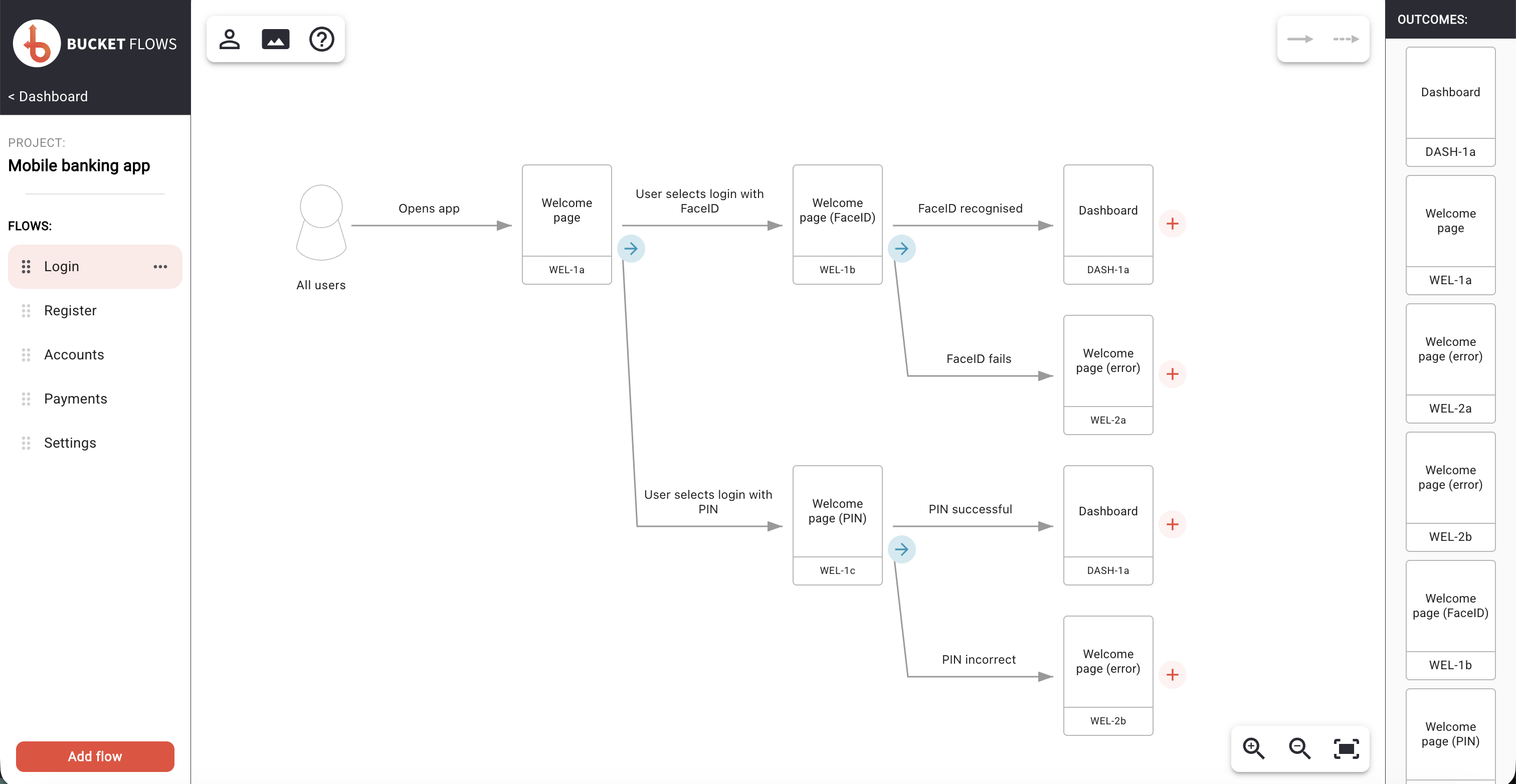
The page is split into three main areas: the Flows sidebar on the left, the canvas in the centre, and the Outcomes sidebar on the right.
Flows page
Flows sidebar
The Flows sidebar contains the flows within the current project.
It shows which flow is currently selected and provides access to flow-level management such as adding, renaming, reordering and deleting flows.
See Flows sidebar for more information.
Flow canvas
The canvas is where the selected flow is displayed and edited.
Actions and outcomes are arranged across the canvas to show the structure of the flow and the different paths through it. The persona for the flow is also shown here.
See Working with Actions, Working with Outcomes and Personas for more information.
Canvas controls
Controls around the canvas provide access to the supporting tools used while working with a flow.
The top-left toolbar provides access to the Persona Library, View Mode and Help.
- The Persona Library contains the personas available within the project and supports assigning personas to flows. See Personas for more information.
- View Mode provides a cleaner way to review flows without the editing controls shown on the main Flows page, and also provides access to PDF output. See View mode for more information.
- Help opens the Bucket Flows help documentation.
The top-right toolbar shows the available action types, allowing actions to be represented as either a Single Action or an Action Series.
The bottom-right controls manage the canvas view, including zooming in, zooming out and fitting the flow to the available screen space.
Outcomes sidebar
The Outcomes sidebar contains the outcomes available within the project.
Outcomes can be reused across flows, helping keep the same result or state consistent wherever it appears.
See Working with Outcomes for more information.
Updated 14 days ago